Read Time: 8 minutes
LinkedIn Premium Subscriptions - Which One is Right For You?
“Is LinkedIn Premium worth it?”
…This is a seemingly straightforward question I get from nearly every student and Brand Inner Circle Community member I work with.
The problem is, the answer isn’t so straightforward.
 |
For starters, “LinkedIn Premium” (kind of) refers to a variety of different types of upgraded LinkedIn plans.
LinkedIn Premium Plans at a Glance
For individuals
Premium Career – Job-seeker tools (applicant & salary insights, AI guidance, limited InMail).
Premium Business – Everything in Career plus more InMail, unlimited search, 365‑day “Who viewed your profile,” credibility badge, custom CTA on your profile, AI writing help.
For sales teams
Sales Navigator (Core, Advanced, Advanced Plus) – Deep lead/account search, alerts, 50 InMail credits, team collaboration, and CRM integrations at higher tiers. (LinkedIn lists the plans; pricing is shown only after sign‑in.)
For recruiters
Recruiter Lite & Recruiter (Corporate/Professional) – Talent search, filters, InMail, pipeline tools; multi‑seat collaboration and higher InMail caps at full Recruiter levels. (LinkedIn quotes pricing.)
For learning
LinkedIn Learning (standalone) – Course library for skills development (also included with many Premium tiers).
For companies
Premium Company Page – Page‑level badge, 365‑day visitors, auto‑invites for engagers, custom CTA buttons on your Page and posts, testimonials, dynamic covers, and AI assistance.
Now, you may rightly remark, “But only three of the plans have the word ‘Premium’ in them, Kait.”
Correct! But, technically, if you have a Recruiter or Sales Navigator account of any kind, you also get access to “Premium Profile” features.
Except for, maybe not even really. This would depend on how you “received” your Recruiter or Sales Navigator account, per this confusing note below from LinkedIn:

If all of that sounds as clear as mud, I assure you you’re not alone.
 |
But hang in there, I’m about to break it down clearly for you.
First up — the bottom line.
Here’s generally what each type of account will run you. I say generally because if you buy annually vs. month-to-month or as a company vs. an individual license, this may fluctuate by $10 here or there. But this is pretty much your monthly base:
2025 pricing windows (US benchmarks)
Prices vary by region, billing cycle, seat count, promos, and even account history. LinkedIn itself notes you’ll see your exact price only when you’re logged in. (Read in the same voice that sounds off at the end of pharmaceutical commercials)

What’s new or meaningfully upgraded in 2025 from the same ol’ same ol’:
AI job search & coaching for Premium members. You can now describe your ideal role in plain language (“remote RevOps lead in climate tech, $160–$190k”) and get matches, with Premium getting early/priority access. (Cool!)
Credibility and conversion features for Business & Pages. Premium Business profiles and Premium Company Pages add a gold badge, custom CTA buttons surfaced on headers, posts, and even in search, plus 365‑day viewer history—useful for warm outreach. (Most of you do not need a premium company page! We’re building your personal brand. Your personal page is the vehicle!
“Which plan should I pick?”
Use this quick litmus test:
Primarily job‑seeking?
Start with Premium Career for 30–60 days. Use applicant insights + AI job search to target roles and InMail hiring managers directly. If you’re not applying weekly or messaging, pause it.
Solo consultant/owner who networks and sells through content?
Premium Business is often enough: unlimited search, 365‑day viewers for warm follow‑ups, profile CTA, and AI writing (although, meh on the AI writing.)
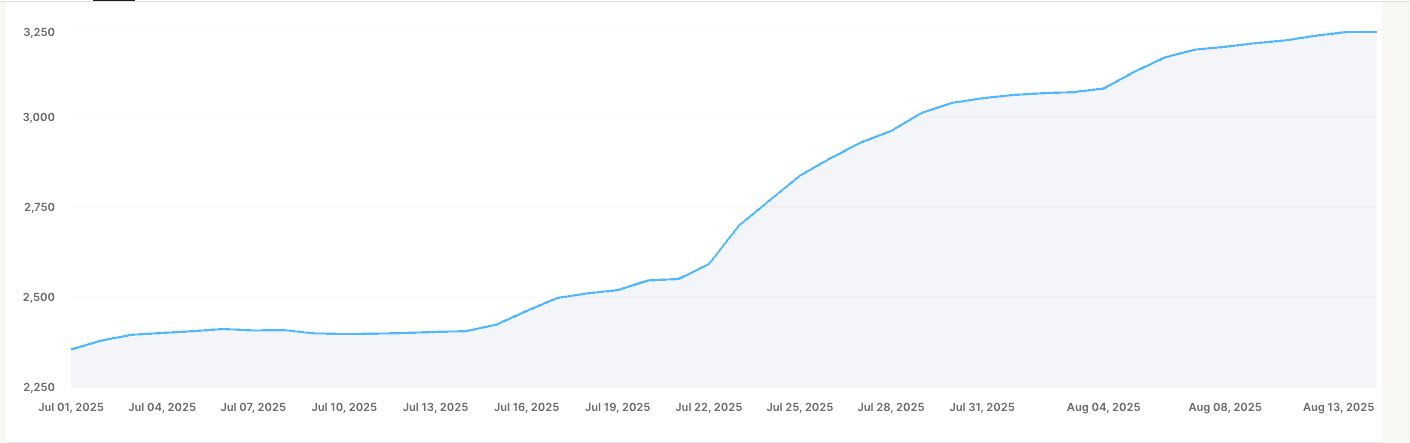
This is what I use, btw. The premium profile button has led to a 1k increase in email list sign-ups for me in the last 30 days alone by using “View my newsletter” as my premium button.
(Also note, we just scrubbed my email list in June and dumped over 1,500 people. I’d rather have a smaller and more engaged list than a large one with unengaged subscribers. The former builds real connections and sales, the latter sets off spam filters. Scrub your list frequently to keep it highly engaged!
You live in the DMs, run outbound daily, or manage a small sales pod (3–10 seats)?
Sales Navigator Advanced pays for itself with team features, buyer intent, and CRM sync. Larger orgs using Salesforce/Dynamics may need Advanced Plus for write‑back.
Hiring occasionally (a few roles/quarter)?
Try Recruiter Lite; if you need collaboration, seat sharing, and more InMail volume, request a Recruiter quote. Expect four‑figure annual spend per seat.
Growing a company presence (vs. a person’s profile)?
A Premium Company Page can help convert Page traffic—especially with CTAs, auto‑invites, testimonials, and dynamic covers. It’s powerful only if you already publish consistently from the Page.
What do YOU need?
If you’re reading this newsletter about building your personal brand on LinkedIn because you’re a consultant, coach, or subject matter expert who monetizes your brain, most likely, you’ll want LinkedIn Premium Business (Again, I use this.)
I say most likely because if you want to be a thought leader and you work for a company and want the potential to be recruited by another company, you may want “Career.”
If you are a thought leader or consultant who works for yourself but you want to do all the sales ninja stuff on the platform through advanced searching and messaging, you may want Sales Navigator.
But, again, by and large, if you are a consultant, coach, or thought leader who works for yourself and sells things like consulting, keynotes, programs, or knowledge products, and you want your content and personal brand to do the selling for you, LinkedIn Premium Business is where I’d suggest you go.
The ROI reality: tools don’t replace a brand
Even the best tier won’t move the needle if:
Your positioning isn’t crisp (who you help, with what, and why you’re different)
Your content isn’t consistent (no clear themes, no proof, no offers)
Your pipeline rituals are absent (weekly DM follow‑ups, outreach blocks, nurture lists)
That’s why, before clients add seats or jump tiers, I have them build a 30‑day personal brand and content system first. It’s the fastest way to turn Premium features into revenue: you’ll have a point‑of‑view, a weekly publishing rhythm, and a follow‑up process that makes “Who viewed your profile,” CTAs, and InMail work.
If you want a done‑with‑you sprint that sets this up, my 30 Day LinkedIn Brand Builder walks you through positioning, a searchable profile, a four‑week content calendar, and simple outreach cadences—the exact backbone that makes any LinkedIn plan (even free) produce opportunities.
No pressure—keep this guide, pick the leanest plan that fits, and get your brand system in place. When you’re ready to compress that learning curve into 30 days, the program is designed to meet you right there.